
September 28, 2026
When to Modernize an Application vs. Rebuild It

QLeap
At some point, most long-running business applications reach an uncomfortable stage. The application still works. Users depend on it. The business processes are built around it. But every change seems to take longer than it should.
A new feature touches five existing modules. A small change requires extensive regression testing. The technology stack is becoming harder to support. Documentation is incomplete. Developers who understand the original system are becoming harder to find.
This is usually when the modernization conversation begins. But there is an important question to answer first:
Should you modernize the existing application, or is it time to rebuild it?
The answer isn't determined simply by how old the application is. A 15-year-old system can have a perfectly workable architecture, while a much newer application can already be difficult to maintain. The better question is:
Can the existing foundation support where the business needs to go next?
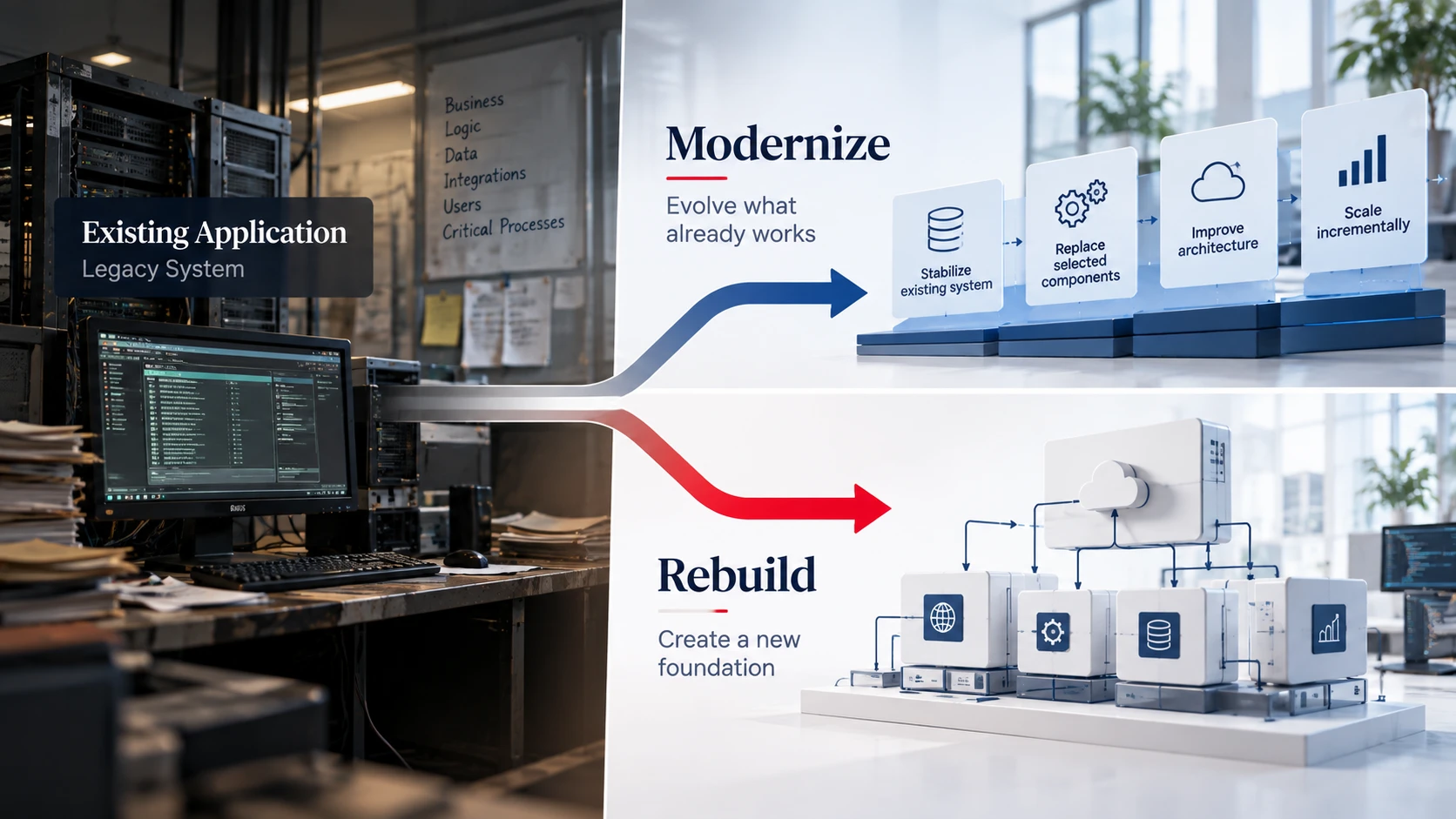
Modernization and rebuilding are two different approaches
Application modernization means improving the existing system while retaining some of its architecture, functionality, data, or components. It could involve:
- upgrading outdated technologies
- restructuring parts of the application
- introducing APIs around existing functionality
- replacing selected components
- improving database architecture
- moving workloads to cloud infrastructure
- introducing automated testing and CI/CD
- improving security and observability
- gradually decomposing a monolithic application
Rebuilding, on the other hand, means designing and developing a new application, using the existing system primarily as a source of business knowledge, data, and requirements.
Neither approach is automatically the right one. The decision depends on the condition of the existing application and what the business needs from it next.
Start with the business, not the technology
One of the easiest mistakes is to begin the assessment by asking:
Is our technology stack outdated?
That is relevant, but it shouldn't be the first question. Start with the business.
1. Does the existing application still support the business well?
If the core workflows are stable and the application continues to support them effectively, there may be considerable value in retaining what already works. If the application itself has become a constraint on the business, the conversation changes.
2. How difficult is it to make a change?
Consider the last few significant changes made to the application. How many components did they affect? How much testing was required? How many unexpected issues appeared?
If even relatively small changes consistently require disproportionate effort, the problem may be architectural rather than functional.
3. How well is the existing business logic understood?
This is particularly important with older systems. Over the years, applications accumulate rules that may never have been formally documented. Some of those rules may be essential to the business.
A rebuild that simply reproduces documented requirements can accidentally leave out years of accumulated business knowledge.
4. Can the existing architecture support what comes next?
The application may work perfectly well today but still be unsuitable for the next stage of the business.
New channels, integrations, transaction volumes, regulatory requirements, geographic expansion, or new digital products can expose limitations that weren't previously important.
When modernization makes sense
Modernization is often appropriate when the existing application still contains substantial business value and its underlying foundation can realistically be improved.
Typical indicators include:
- The core business processes are still valid.
- The existing data is valuable and reasonably reliable.
- Most of the application can still be understood and tested.
- The problems are concentrated in particular components.
- Existing integrations would be expensive or risky to recreate.
- The architecture can be improved incrementally.
- The business cannot afford a large-scale replacement project at once.
For example, an organization may have a stable core application but an outdated reporting layer, tightly coupled integrations, or an unsupported UI framework. There may be little reason to replace everything. Modernizing those specific areas could deliver much of the required improvement with considerably less disruption.
When rebuilding deserves serious consideration
There are also situations where continuing to modernize the existing system becomes increasingly difficult to justify.
Some common indicators are:
The architecture has become fundamentally difficult to change
If business functionality is deeply intertwined across the application, isolating individual components may be impractical.
The technology is no longer realistically supportable
An unsupported operating system, framework, database version, or development environment can create security, operational, and hiring risks.
Business logic and technical dependencies are inseparable
If nobody can confidently determine what will break when a particular component changes, modernization becomes increasingly risky.
Testing has become a bottleneck
If the organization cannot reliably regression-test the application, every significant change becomes a production risk.
The data model no longer reflects the business
Sometimes the biggest problem isn't the application code. It is the underlying data structure. If the existing model has become difficult to extend or reconcile with the way the business operates today, rebuilding parts of the platform may be more practical.
The application is preventing strategic change
This is perhaps the most important indicator. If the business wants to introduce new capabilities but the existing platform consistently prevents or delays them, the technology has moved from being an operational asset to becoming a strategic constraint.
Modernization vs. Rebuild: A practical comparison
| Consideration | Modernization | Rebuild |
|---|---|---|
| Existing business logic | Retained and evolved | Revalidated and redesigned |
| Existing code | Partially retained | Mostly replaced |
| Existing data | Usually retained | Migrated or transformed |
| Initial disruption | Generally lower | Generally higher |
| Time to first improvement | Usually shorter | Usually longer |
| Architectural freedom | Constrained by existing system | Greater |
| Migration complexity | Usually incremental | Usually significant |
| Risk | Distributed over stages | Concentrated around transition |
| Best suited for | Systems with a viable foundation | Systems with fundamental structural limitations |
This isn't a scorecard. It is simply a way to understand what you are trading off with each approach.
You don't always have to choose one
There is a third option that is often overlooked:
Progressive modernization
Instead of deciding between “keep the old system” or “replace everything,” you can gradually move from one architecture to another. For example, an organization could:
- 1Keep the existing core application running.
- 2Introduce APIs around selected capabilities.
- 3Move specific workloads to newer services.
- 4Replace high-risk or high-change modules first.
- 5Establish a new data or integration layer.
- 6Gradually move users and processes to the new components.
- 7Retire legacy components as their responsibilities disappear.
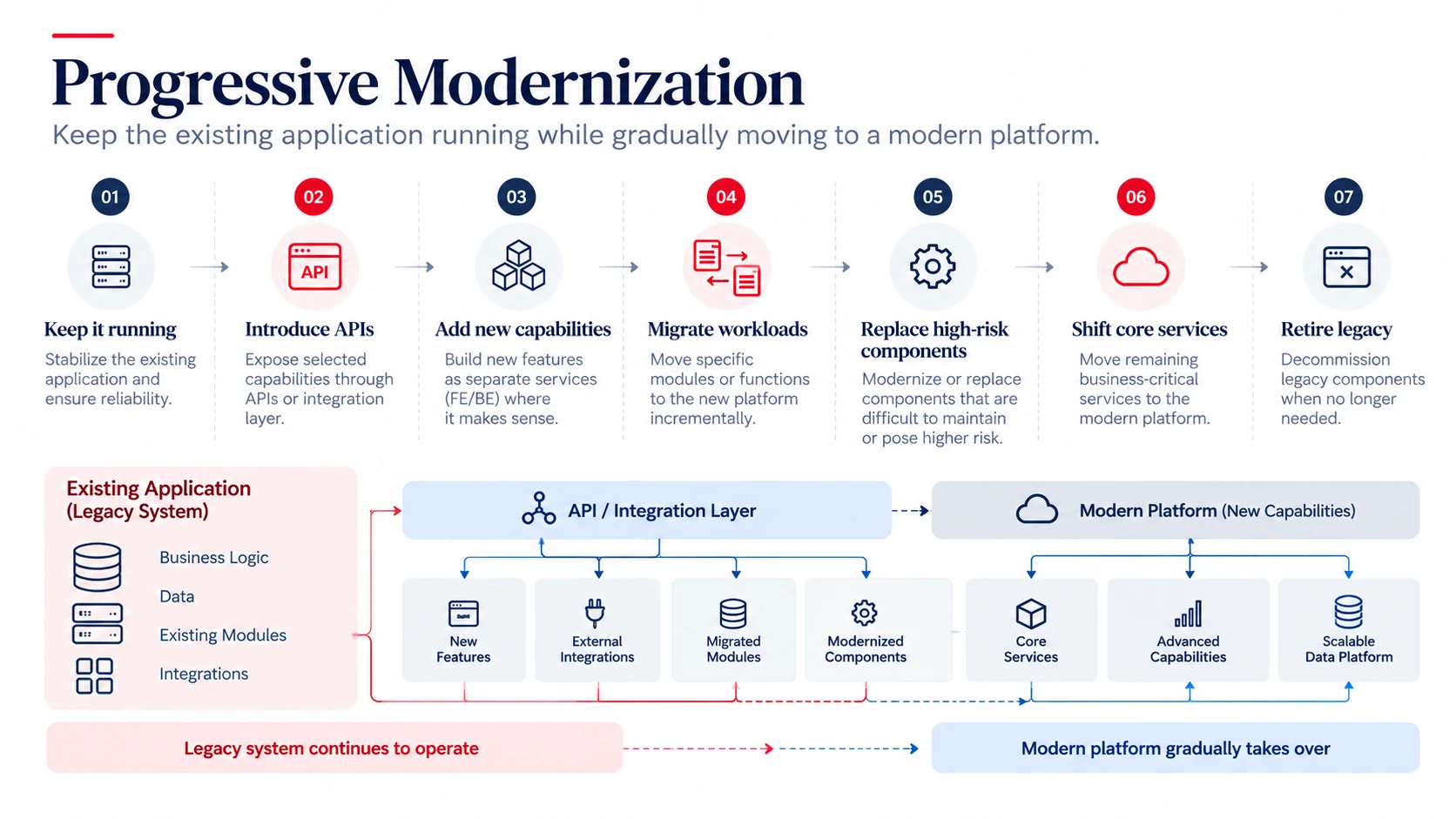
This approach can be particularly useful when the existing application contains valuable business logic but its architecture cannot support the organization's long-term direction.
The objective isn't to modernize everything. It's to modernize the parts that matter.
A simple framework for making the decision
Before choosing a modernization or rebuild strategy, evaluate the application across six areas.
1. Business value: Which parts of the existing system are critical to the business?
2. Architecture: Can the current architecture be changed without creating unacceptable complexity or risk?
3. Data: Is the existing data model still appropriate? How difficult would migration be?
4. Changeability: How much effort does it take to introduce, test, and release a meaningful change?
5. Future requirements: What does the business expect the platform to support over the next three to five years?
6. Risk and investment: What are the operational, migration, security, and financial implications of each approach?
The important point is that these dimensions should be considered together. A technically attractive solution may not make business sense. Likewise, the cheapest short-term option may create significantly higher costs over several years.
Don't underestimate the cost of doing nothing
There is one option that often gets left out of the discussion:
Do nothing.
Keeping an existing application unchanged may appear to be the lowest-cost option. But the cost can show up elsewhere:
- slower delivery
- increasing maintenance effort
- security exposure
- dependency on scarce skills
- growing infrastructure costs
- inability to integrate with newer platforms
- difficulty supporting new business requirements
- increasing operational risk
These costs don't always appear as a single line item in the technology budget. That doesn't make them insignificant.
The goal isn't a newer application
A modernization or rebuild project can easily become a technology exercise. A new framework is selected. A new architecture is designed. The old system is replaced.
But a newer application isn't necessarily a better business platform. The real objective should be to create a system that is:
- easier to change
- easier to operate
- secure and supportable
- capable of integrating with other systems
- appropriate for expected scale
- aligned with current business processes
- flexible enough for future requirements
Technology is the means. The business outcome is the reason for doing the work.
So, which path should you take?
There isn't a universal answer. If the existing application has a sound foundation and the problems are concentrated in specific areas, modernization may be the more practical path. If the underlying architecture, data model, technology dependencies, and changeability have all become fundamental constraints, a rebuild may deserve serious consideration. And when neither approach works well on its own, progressive modernization can provide a path between the two.
The important decision isn't whether to preserve or replace the old system. It is understanding what is worth preserving, what needs to change, and what the business needs the platform to become.
Need to decide what comes next?
Before committing to a modernization or rebuild program, an architecture assessment can help identify the application's current constraints, dependencies, modernization opportunities, and potential transition paths.
QLeap helps organizations evaluate existing technology landscapes and define practical paths toward modern, maintainable platforms.
The right decision starts with understanding what you already have.